I wrote about the four stages of AI coding — from prompting to orchestrating. That article mapped the progression. This one is the field guide for Stage 3. The stage where you stop assisting the AI and start delegating to it.
You’ve asked ChatGPT for code. Maybe you use autocomplete in your editor. That’s Stage 1 and 2 — and they work. But there’s another gear. It changes how you spend your time.
If you delegate work to AI agents already, I want to hear your experience. Compare notes with me. Here’s what 72 sessions, 735 messages, and 118 commits taught me. All while building an agent orchestration platform to solve the very problems this article describes. How I’m using Stage 3 to build Stage 4. More on that soon.
The mindset shift
Here’s what surprised me most. The value of AI agents isn’t speed. It’s that scoping and verification become the main activity. Code becomes the byproduct.
I spend more time scoping the work than the implementation takes. That sounds inefficient. The results say otherwise — far better than when I let the agent just run.
This flips the developer’s role. In Stage 1-2, you do the work and AI assists. In Stage 3, the AI does the work and you make judgement calls. The skill shifts from “writing code” to “specifying intent.” You describe what you want. The agent executes. You verify the result.
Think of cooking. Stage 2 is someone reading you tips while you cook. Stage 3 is handing a recipe to a sous chef and tasting the result.
Sound familiar? It should. This is traditional software engineering — scope, plan, review, verify — moved up a layer. The thoughtful work hasn’t gone anywhere. It’s just no longer the code itself. It’s everything around it. This is why I don’t think engineers are getting replaced — the job changes, the judgement doesn’t.
Now the uncomfortable truth. Stage 3 is both breakthrough and bottleneck. You ship faster than ever. You also babysit more than ever. Those bad experiences people report — sloppy output, hallucinated fixes, diffs nobody can review — aren’t model problems. They’re system problems. The models are extraordinary. The system around them makes or breaks the output.
Here’s the system I’ve built.
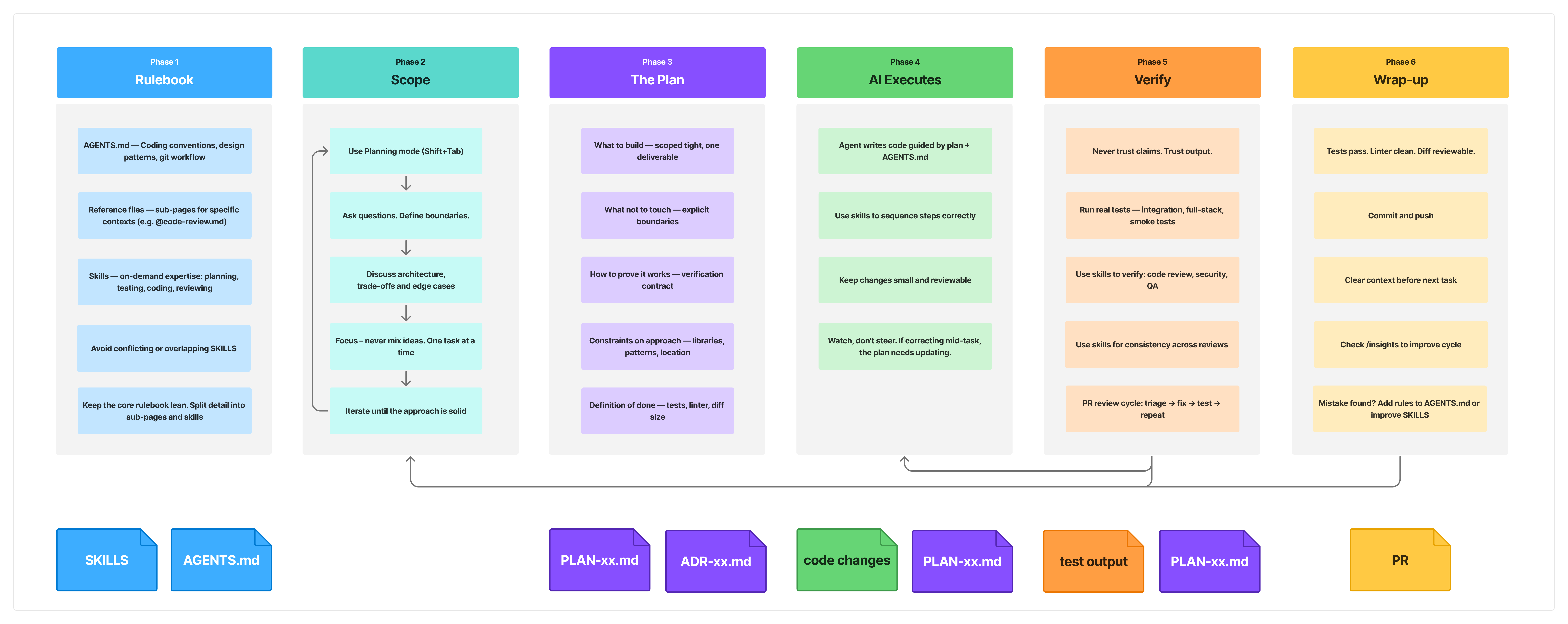
Want the quick-reference version? Here’s the cheat sheet.
The foundation: the rulebook
Before any task starts, set up the rulebook.
Your AI agent has no memory between sessions. Every convention, every pattern preference, every “don’t do this” — write it down. The agent reads it at the start of every task. Without it, you’re re-explaining your standards from scratch every time.
The core file is CLAUDE.md (or AGENTS.md if you want a tool-agnostic name). Checked into git. Holds coding conventions, design patterns, git workflow rules, and standing instructions. One of those instructions: always verify your work and show the output. This file is your engineering culture, translated for the agent.
Keep it under 200 lines. Bloated rulefiles eat context and adherence drops. If a rule belongs in a linter or formatter config, it doesn’t belong here. Litmus test: “would removing this rule cause a mistake?” If not, cut it.
Around that core file, three mechanisms keep it lean:
Rules — modular instruction files that load alongside the core rulebook. Split by concern: code style, testing standards, API conventions. Path-scoped rules only activate when the agent works in matching directories. Zero wasted tokens.
Skills — on-demand expertise the agent invokes when the task matches. A deployment checklist. A database migration guide. A security review workflow. Skills can bundle supporting files and even spawn subagents with restricted tool access; e.g. a code reviewer that can only read, not write.
Permissions — allow and deny lists that control what the agent can run. Pre-allow your build and test scripts. Deny destructive commands and .env reads. This helps — but it doesn’t solve the problem. You’ll still spend time pressing “Allow” on prompts the agent shouldn’t need to ask about. It’s one of Stage 3’s biggest friction points and part of why the ceiling exists.
For a deep dive on the full folder structure, Avi Chawla’s Anatomy of the .claude/ Folder is an excellent walkthrough.
The compounding loop is the real payoff. A mistake happens. You add a rule — or improve a skill. The agent stops making that mistake. Over weeks, the rulebook captures institutional knowledge. Every session gets better than the last. It’s like onboarding a new hire — except this one reads the docs. And because it’s in git, the whole team benefits from every rule anyone adds.
The workflow: Scope → Plan → Execute → Verify → Wrap-up
This is the workflow for every task. Scoping and verification take 80% of your time. The agent executing takes 20%. That ratio feels wrong until you try it. It’s why the results are good.
Scope
This is the game changer, the mindset shift. For anything beyond a trivial task, scope the work before the agent writes a line of code.
Scoping is a conversation. You know what you want — you just haven’t articulated it with enough precision to build against. “Should we use YAML configs or a database table?” “What are the edge cases?” “How does this interact with the auth flow?” You go back and forth. Poke holes. Define boundaries. I use the agent for architecture decisions and system analysis. It thinks through trade-offs I’d sketch on a whiteboard.
One critical rule: never inject new ideas mid-scope. The agent will blend them into the current feature. You won’t notice until the PR review. Then you’re untangling two features from one branch. Finish the task. Commit. Clear context. Start fresh.
The mistake that taught me this? Vague direction. The agent built the wrong thing. Confidently. Multiple times. The fix was always the same — tighter scoping.
Plan
Scoping is the conversation. The plan is the artifact that comes out of it. It’s the concrete, scoped task definition you hand the agent when you switch from scoping to execution.
An agent plan isn’t a regular engineering spec. An agent can’t read between the lines. It can’t ask the PM a clarifying question. It will fill any gap with its own assumptions. A good agent plan covers five things:
What to build — scoped tight. Not “add user notifications.” Instead: “add an email notification when a patient appointment is confirmed, triggered from the booking service, using the existing email template system.”
What not to touch — the most important part for agents. They love to “improve” nearby code. Explicit boundaries prevent scope creep. “Don’t modify the API layer. Don’t refactor existing tests. Don’t change the database schema.”
How to prove it works — the verification contract. Define this upfront, not after the code is written. “Write integration tests for the new notification path. Run the existing booking test suite. Confirm nothing breaks. Show me the test output.”
Constraints on approach — which libraries, which patterns, where to put the code. Without this, the agent picks its own path. “Use the existing EmailService. Don’t introduce a new dependency. Follow the repository pattern from the booking module.”
Definition of done — what does the PR look like? “One commit. Tests passing. Linter clean. Diff under 200 lines.”
That last point matters. A good plan keeps changes small. You’ve broken the work into pieces during scoping. Small changes are reviewable. Reviewable changes are verifiable. Break this chain — vague plan, huge diff, no tests — and the whole thing collapses. This is why people have bad AI experiences. They skip the plan. The agent runs wild. They get a 2000-line diff. They can’t review it. They conclude “AI coding doesn’t work.” Well,the agent wasn’t the problem, the scope was.
For anyone at Stage 1-2: this one thing will change your results the most. A tight plan turns a bad AI experience into a productive one.
Execute
Hand the agent the plan. Let it work.
This is the 20%. The agent writes code, guided by the plan and the rulebook. Your job during execution is to watch, not steer. If you find yourself correcting the agent mid-task, the plan or the rulebook needs updating — not the conversation.
Large-scale refactors still work at this stage. I’ve landed architectural changes with 112 tests passing across many files. But you verify each step before starting the next. A refactor is a sequence of small, verified steps. Not one giant leap.
Verify
The form varies. The discipline doesn’t.
Never trust the agent’s claim that something works. Trust test output. Trust logs. Trust a running application. The agent will tell you it fixed the bug. Don’t take its word for it. Make it show you.
This isn’t about strict TDD — though TDD is one excellent approach. The principle is broader. The plan already defines how the agent proves its work. Now you hold it to that contract.
What verification looks like depends on the task:
- New feature: “Spin up the full stack. Walk through the user flow. Show me the response at each step.”
- Bug fix: “Run the integration suite before and after. Show me both outputs.”
- API change: “Hit the endpoint with real payloads. Show me the request and response.”
- Refactor: “Run the full test suite. Every existing test must still pass. Then start the app and smoke test the affected flows.”
- Frontend change: “Start the dev server. Load the page. Describe what you see.”
My tightest feedback loop is the PR review cycle. The agent reviews a diff. I triage by severity. The agent fixes each finding. Runs tests. Shows output. Commits. Pushes. I’ve done eight rounds in a single session. The agent handles multi-file edits and test verification. I make the judgement calls.
PostToolUse hooks auto-run formatters and linters after every edit. The system enforces standards. The agent doesn’t have to remember. Across 72 sessions I logged 1,425 shell calls. Running. Testing. Verifying.
The behavioral shift for your first session: the agent says “done, it should work now.” Don’t accept it. Say “show me the test output.” That one habit changes everything.
Wrap-up
Tests pass. Linter clean. Diff reviewable. Now finish the job.
Commit and push. Open the PR. Then — before you start the next task — stop and ask: what went wrong? What took longer than it should have? Did the agent pick a wrong approach? Miss a convention? Hallucinate a fix?
Every answer is a new rule. Add it to your CLAUDE.md or improve a skill. This is the compounding loop. It takes thirty seconds and it makes every future session better. Skip it and you’ll hit the same problem next week. Do it and the system learns.
Then clear context. The current session is done. Start fresh for the next task. One task, one session.
The discipline: context hygiene
The kitchen-sink anti-pattern
AI agents degrade as context grows. Mixing unrelated tasks in one session is the fastest path to bad output.
You start one task. Ask something unrelated. Go back to the first task. Now the context is full of noise. During scoping, this is catastrophic. The agent bakes two separate features into one design. You don’t notice.
Wrap-up handles this — clear context after every task. But for long-running tasks that span multiple sessions, capture the goal, progress, and next steps in a handoff document before starting fresh.
I’ll be honest — I don’t do this enough. I know it’s right. I keep skipping it. Every time I skip it, I regret it.
Parallelism
Once you’ve dialed in the rest, run multiple agent sessions at the same time. Git worktrees make this work. Each worktree gets its own session. Changes don’t conflict.
This is the biggest throughput multiplier. But it’s listed last for a reason. The manual orchestration is exhausting. You get 3-4x throughput. You also context-switch between sessions, track what each agent is doing, and resolve conflicts when branches collide.
This is where Stage 3 hits its ceiling. You’ve optimised the agent’s work. Now you’re the bottleneck again. Not as a coder. As an orchestrator.
The honest accounting
What still goes wrong
Wrong approach — 19 times in 72 sessions, the agent picked the wrong library, pattern, or architecture. The plan didn’t constrain the approach enough. Or the agent explored when the task was clear. “Just build it” is a valid instruction.
The infinite debug loop — The agent claims it found the issue. Applies a fix. Tests fail. Claims it found the real issue. Applies another fix. Tests fail again. This loops forever if you let it. The escape: tell the agent to stop. Research the issue. Find the root cause first. This helps unlock it.
Context pollution — The kitchen-sink problem again. The agent references things from earlier that aren’t relevant. Quality drops in ways that are hard to spot.
Regressions — The agent fixes one bug and breaks something else. This is why “commit before you debug” matters. Commit your working state first. Then ask the agent to fix. If the fix introduces a new problem, you can roll back clean.
Selective hearing — The agent doesn’t always follow instructions. You write clear rules. It ignores half of them. Or worse — two rules conflict and the agent picks whichever it saw last. The rulebook helps. But agents still drift, especially in long sessions. You catch it in review. Or you don’t, and it ships.
Setup overhead — Every repo needs its own rulebook. Rules, skills, permissions — built from scratch each time. The system works once it’s set up. Getting it set up is the tax. Until then, I’m typing the same instructions, session after session.
Messy PRs — This is the one that burns. The agent mixes features. Mixes concerns. Commits land on the wrong branch. Sometimes the agent forgets an entire branch of commits and opens a PR that’s almost empty. You stare at a diff that should be clean and it’s a tangled mess of unrelated changes. All the time you saved writing code, you spend untangling the PR. This is Stage 3’s ugliest failure mode. It comes back to scoping, planning, and keeping changes small — but even when you do everything right, it still happens.
What I’m still figuring out
How to set the right configuration balance. The agent over-plans when I want code. Under-plans when the task is complex.
How many upfront constraints to provide. Too few and the agent picks a wrong approach. Too many and I might as well write the code myself.
When to let the agent drive versus when to steer. And using context clearing — the habit I know matters and keep neglecting.
Where Stage 3 hits the ceiling
Close the laptop — the agent stops. Go to a meeting — it sits there waiting. Run four sessions at once — you’re babysitting, not engineering.
The time you save writing code, you spend supervising agents. This isn’t a model problem. It’s an infrastructure problem. Autonomy. Sandboxing. Enforced pipelines. Hosting that doesn’t die when your lid closes.
Stage 3 is powerful. But it’s a ceiling. And the ceiling is you.
I’m building toward a system where agents run against a queue of plans, with enforced pipelines and sandboxed execution. No laptop lid required. Stage 4. That’s a different article — follow me if you want to see where it goes.
Where to start
If you’ve read this far, here are concrete starting points.
If you’re at Stage 1 (prompting, copy-paste): Pick an agentic tool. Give it a real task — not a toy exercise. Take a bug from the backlog. Write one paragraph: what’s wrong, what “fixed” looks like. Let the agent work. Watch what it does. One real task teaches more than ten tutorials.
If you’re at Stage 2 (pair programming, autocomplete): Give the agent a whole task instead of guiding it line by line. Start with a PR review cycle — low risk, high learning. Point the agent at a diff. Ask it to review for bugs and logic errors. Let it fix what it finds. You triage. You keep full control but experience the delegation model.
If you’re ready to go deeper: Start your next feature by scoping it with the agent. Spend twenty minutes defining the boundaries before any code. Write the plan with all five components. What to build. What not to touch. How to prove it works. Constraints. Definition of done. Then let the agent execute. Watch the difference.
For the team: Start a CLAUDE.md. It doesn’t need to be complete on day one. Add three conventions you wish the agent would follow. Next time it makes a mistake, add a rule. In a month, every session gets better. Because it’s in git, every person benefits from every rule anyone adds.
The system in one line: Scope → Plan → Execute → Verify → Wrap-up. The form varies. The discipline doesn’t.
Want the quick-reference version? Here’s the cheat sheet.
I went from sceptic to running multiple AI agents across a production codebase. It’s not magic. It’s not effortless. But it compounds. Every session teaches something. Every rule makes the next session better.
The gap between “AI coding doesn’t work” and “AI coding is the biggest force multiplier I’ve found” is a system. This is mine.
I want to hear yours.
If Stage 3 is your ceiling right now, Stage 4 is what comes next. I'm building the infrastructure for it — that's Lotsa.
Try Lotsa →This essay sits within a broader thesis on AI coding. See the full argument →